

01Overview
text
C :void binary_print(unsigned int value) {unsigned int mask = 0xff000000;unsigned int shift = 256256256; // or 0x1000000unsigned int byte, byte_iterator, bit_iterator;for(byte_iterator=0; byte_iterator < 4; byte_iterator++) {byte = (value & mask) / shift;printf(" ");for(bit_iterator=0; bit_iterator < 8; bit_iterator++) {if(byte & 0x80)printf("1");elseprintf("0");byte = 2;}mask /= 256;shift /= 256;}}================================================================What does it do?✅ Prints the binary of a 32-bit integer cleanly, byte-by-byte, bit-by-bit.✅ Used to understand flags, memory layouts, and exploit development. ⚙️Real Example: `O_WRONLY | O_APPEND | O_CREAT`In Linux:C:define O_WRONLY 01define O_APPEND 02000define O_CREAT 0100---------------------------------------------------------------------------------------------------------Step 1: Calculate Combined ValueO_WRONLY = 0x00000001 = 1O_APPEND = 0x00000800 = 2048O_CREAT = 0x00000100 = 256Total value = 1 + 2048 + 256 = 2305 (decimal)-------------------------------------------------------------------------------------------------------🚀 Step 2: Binary of 2305Decimal: `2305`32-bit binary:00000000 00000000 00001000 000000010x0801` in hex.--------------------------------------------------------------------------------------------------------Step 3: Full `binary_print` executionInitialization:mask = 0xff000000; // 11111111 00000000 00000000 00000000shift = 0x1000000; // 16777216---------------------------------------------------------------------------------------------------------================================================================Iteration Table and Detailed Breakdown :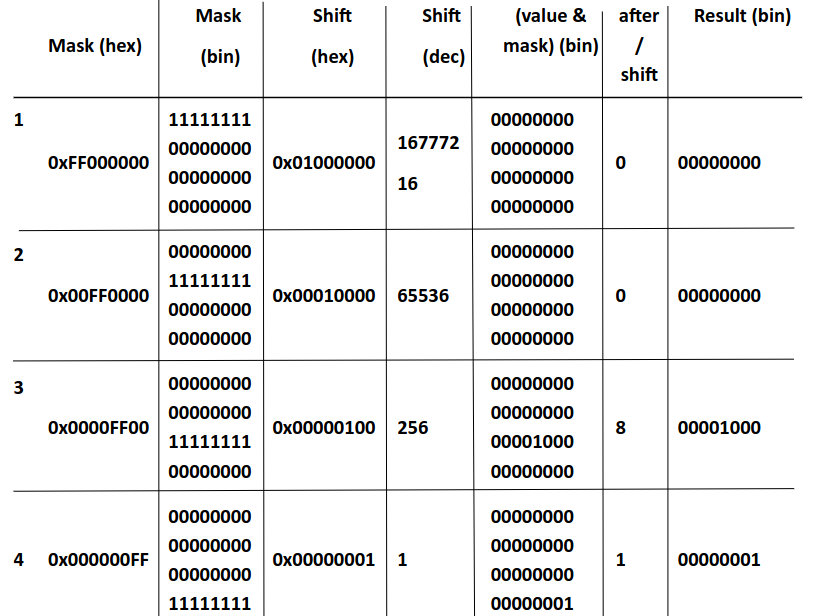Detailed Step-by-Step Execution :1. Iteration 1 (byte_iterator = 0) Mask:0xFF000000 = 11111111 00000000 00000000 00000000 Shift:0x01000000 = 16777216 value & mask:00000000 00000000 00001000 00000001 &11111111 00000000 00000000 00000000 =00000000 00000000 00000000 00000000 Divide:0 / 16777216 = 0 Bit printing:Using:for(bit_iterator=0; bit_iterator < 8; bit_iterator++) {if(byte & 0x80) printf("1"); else printf("0");byte *= 2;}Since byte = 0:00000000 Mask and shift update:mask /= 256 => 0x00FF0000shift /= 256 => 0x00010000 (65536)================================================================2. Iteration 2 (byte_iterator = 1) Mask:0x00FF0000 = 00000000 11111111 00000000 00000000 Shift:0x00010000 = 65536 value & mask:00000000 00000000 00001000 00000001 &00000000 11111111 00000000 00000000 =00000000 00000000 00000000 00000000 Divide:0 / 65536 = 0 Bit printing:00000000 Mask and shift update:mask /= 256 => 0x0000FF00shift /= 256 => 0x00000100 (256)================================================================3. Iteration 3 (byte_iterator = 2) Mask:0x0000FF00 = 00000000 00000000 11111111 00000000 Shift:0x00000100 = 256 value & mask:00000000 00000000 00001000 00000001 &00000000 00000000 11111111 00000000 =00000000 00000000 00001000 00000000 Hex: 0x00000800 = 2048 Divide:2048 / 256 = 8 Bit printing:8 in binary:00001000Printing: byte = 8 = 00001000 loop:o 00001000 & 0x80 (128) = 0 → 0o shift left: 00010000o 00010000 & 0x80 = 0 → 0o shift: 00100000o 00100000 & 0x80 = 0 → 0o shift: 01000000o 01000000 & 0x80 = 0 → 0o shift: 10000000o 10000000 & 0x80 = 128 → 1o shift: 00000000o 00000000 & 0x80 = 0 → 0o repeat → 0o repeat → 000001000 Mask and shift update:mask /= 256 => 0x000000FFshift /= 256 => 0x00000001 (1)================================================================4. Iteration 4 (byte_iterator = 3) Mask:0x000000FF = 00000000 00000000 00000000 11111111 Shift:0x00000001 = 1 value & mask:00000000 00000000 00001000 00000001 &00000000 00000000 00000000 11111111 =00000000 00000000 00000000 00000001 Hex: 0x00000001 = 1 Divide:1 / 1 = 1 Bit printing:1 in binary:00000001Printing: byte = 1 = 00000001 loop:o 00000001 & 0x80 = 0 → 0o shift: 00000010o 00000010 & 0x80 = 0 → 0o shift: 00000100o 00000100 & 0x80 = 0 → 0o shift: 00001000o 00001000 & 0x80 = 0 → 0o shift: 00010000o 00010000 & 0x80 = 0 → 0o shift: 00100000o 00100000 & 0x80 = 0 → 0o shift: 01000000o 01000000 & 0x80 = 0 → 0o shift: 10000000o 10000000 & 0x80 = 128 → 100000001-------------------------------------------------------------------------------------------------------Final output:00000000 00000000 00001000 00000001Cleanly prints the full 32-bit value of flags, byte-by-byte.================================================================Summary :1. Masking isolates only one byte by zeroing others: value & mask2. Shifting brings the target byte to LSB for easy printing: (value & mask) / shift3. Bit loop (byte & 0x80, then byte *= 2) prints each bit in the isolated byte.4. Full loop prints 32 bits cleanly, 8 bits per iteration.5. This logic and muscle memory are critical in reversing and exploitation.================================================Why not print value directly?Directly printing:2305 = 00000000 00000000 00001000 00000001is possible, but:✅ This function:1. Cleanly separates bytes.2. Allows bit-by-bit inspection.3. Is useful for fuzzing, patching, reversing, binary debugging.4. Builds muscle memory for bit masking and shifting, critical for:5. Analyzing binary flags================================================================🚩 Why Masking and Shifting?1. Masking: Zeros out unwanted bits, isolates specific byte:`value & mask` ⇒ Only keeps the target byte.2. Shifting: Moves isolated byte to least significant position for bit testing:Allows simple `if (byte & 0x80)` checks for each bit.3.Bitwise Inspection:Validate exact flag bits.Debug system calls, syscall flags, network flags.